
To register for our online service you just need:
- Your email address
- One of your original Ecology account numbers (10 digit)
Click here now to register or watch the step-by-step guide below.
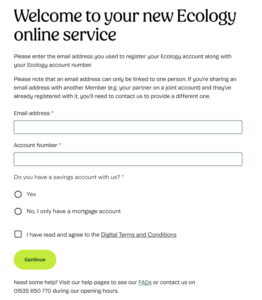
1. Enter your account details
- Enter the email address you use for Ecology. This is the email address we send communications to, or one you’ve previously used to log in.
- If you share an email address with another Member, please contact us so we can add a new email address to your account.
- Enter one of your existing 10‑digit Ecology account numbers.
- Select whether you have a savings account with us, or a mortgage account only.
- Read and agree to our Digital Terms and Conditions.
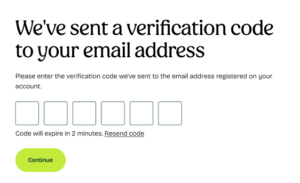
2. Verification code
- We will send a verification code to your email address.
- Enter the code on screen to continue.
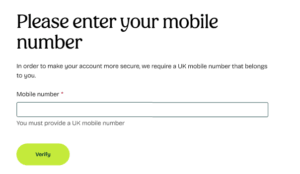
3. Enter mobile number
- If we already have your mobile number, we’ll send a code to that number.
- If we don’t, you’ll be asked to enter your mobile number first.
- Enter the code and select Continue.
4. Create your password
Create a password that is unique to you. This is the password you will use to log in. Your password must include:
- At least 8 characters
- 1 special character
- 1 number
- 1 lowercase letter
- 1 uppercase letter
Repeat your password to confirm it, then select Continue.
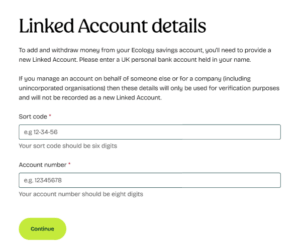
5. Linked account details
- If you only have a mortgage account with us, you will not see this screen.
- If you have a savings account, you’ll be asked to enter details of a linked bank account.
- This must be a UK personal bank account held in your name.
- Select Continue to proceed.
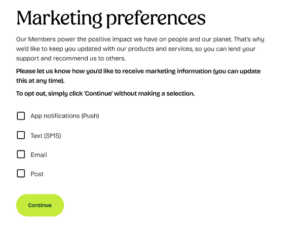
6. Marketing preferences
- Choose how you would like us to keep you informed about our products and services.
- Select Continue once you’ve made your choices.
7. You’re all set
You are now registered for Ecology’s Online Service.
You can:
- Log in to your account at any time using the Log in button at the top right of our homepage
- Download the Ecology App to manage your account(s)
Search for “Ecology Building Society” in the App Store or Google Play.
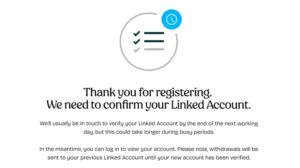
8. Linked account validation (if there is an issue)
- If we’re unable to validate your linked account details, you may see this screen.
- You’ll still be able to use the Online Service and app.
- We’ll contact you shortly to resolve the issue.
Having trouble registering?
We’re here to help.
Call us: 01535 650 770
Email: [email protected]